
We are excited to be rolling out a number of new features in your GEM Portal this December!
Our team has been working hard to bring you powerful new tools that will help you track, analyse, and report on your grant applications more effectively than ever before.
New Application Tracker Dashboard
The headline feature of this release is our brand new Application Tracker Dashboard – a comprehensive analytics hub that transforms your grant application data into actionable insights.

The new Dashboard uses data from your application project records to present various statistics and graphs of your grant applications history.
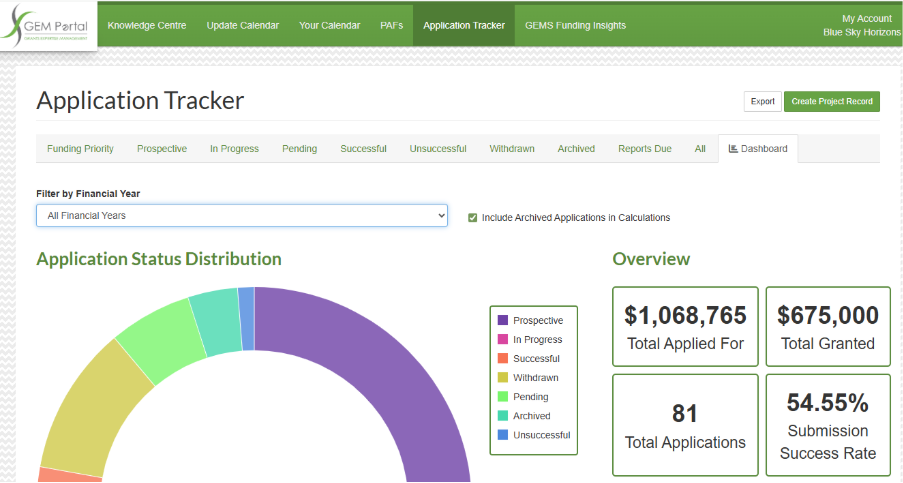
Key features:
- Flexible filtering: View data by specific financial years or across all years
- Include/Exclude archived applications: Control whether archived records appear in your analytics
- Export graphics: Right-click on graphs and widgets to copy them directly into your reports
- Live data: All statistics update automatically based on your application records
Need help archiving application records? Check out our ‘Archive Application Tracker Records‘ How To guide in the Knowledge Centre.
⚠️ Important: Financial Year Field Required
The Dashboard reporting is driven by the Financial Year field on your application records. Each project record needs this value set (whether calendar, financial, or reporting year – depending on your organisation’s reporting structure).
Need help with bulk updates? If you have many existing records without Financial Year values, our Client Experience Team can help with backend bulk updating. Just let us know your organisation’s requirement for reporting years.
Enhanced Application Tracker Filtering
We’ve brought the powerful filtering capabilities you love from Your Calendar to the Application Tracker!
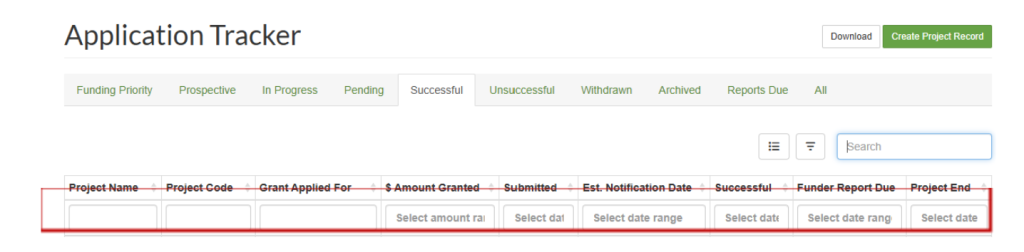
Just like Your Calendar you can save filters and set a default filter. After you have applied your filters you can download the filtered list of project records into Excel.
This means you can quickly find exactly what you’re looking for – whether it’s applications by grant amount, submission date, funding status, or any other criteria that matters to your workflow.
Personalised Calendar Filters
For teams using saved filters in Your Calendar, we’ve added an important enhancement: individual default filters per user.
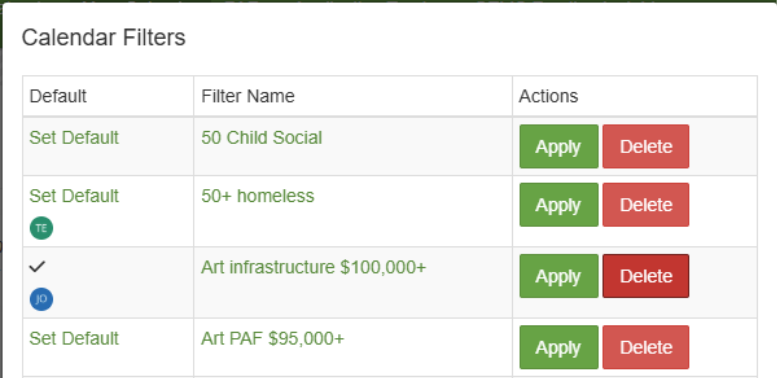
Previously, setting a default filter affected all users. Now, each team member can configure their own default filter, ensuring everyone sees the view most relevant to their role when they open their calendar.
Perfect for teams where:
- Different members focus on different funding categories
- Regional managers need location-specific views
- Team members work with different grant value thresholds
Project Duration Tracking
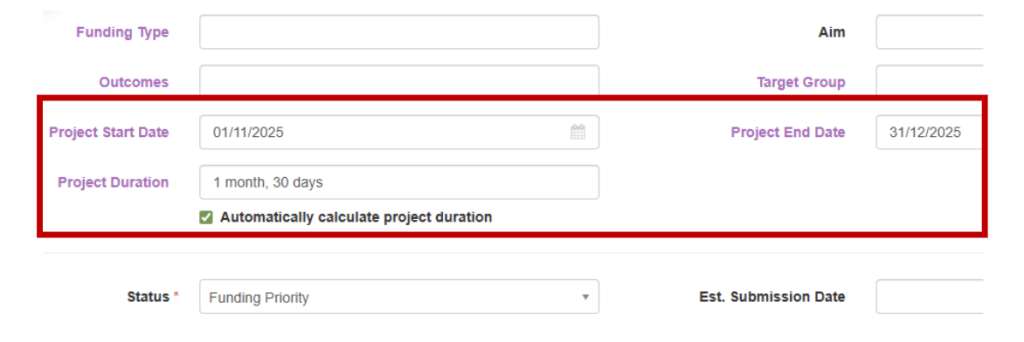
We’ve added a new Project Duration field to the Funding Priority form in Application Tracker, giving you better visibility into project timelines.
Two ways to track duration:
- Manual entry: Type your own custom duration value
- Automatic calculation: Tick “Automatically calculate project duration” and the system will calculate it based on your Project Start Date and Project End Date
Plus many other small tweaks and improvements throughout GEM Portal to enhance your experience.
Upcoming training
Join our next GEM Portal Refresher session where we’ll demonstrate all these new features live and answer your questions.
1. Tuesday, 20 January 2026 – 11:00am Brisbane / 12.00pm Melbourne, Sydney
Click this link to register for webinar: https://us06web.zoom.us/webinar/register/WN_fq9vZyW_SyC3Nedzq1TkEQ
2. Tuesday, 17 February 2026 – 11:00am Brisbane / 12.00pm Melbourne, Sydney
Click this link to register for webinar: https://us06web.zoom.us/webinar/register/WN_3Q3e48_KQUqgqMEMPofFnQ
We want your feedback!
We are delighted to bring you these latest updates, which demonstrate our commitment to continuously improving GEM Portal based on your needs and suggestions.
Have an idea for a new graph, reporting widget, or feature? We’d love to hear from you! Your feedback directly shapes the future of GEM Portal.
Get in touch with our Client Experience Team: [email protected]
We’re here to help you make the most of your GEMS!